Weekly certified payroll for public-works subs, done right.
Set up the job once — Payrollproof pins the official wage determination for your county and trade. Enter each week's hours and download the filing-ready report, with the overtime, fringe, and prevailing-floor math derived for you.
$79/month per active job. Cancel when the job ends. Setup and preview are free.
Sample certified payroll report
Generated for a fictional Ohio electrical subcontractor from the real OH20260001 determination, modification 4.
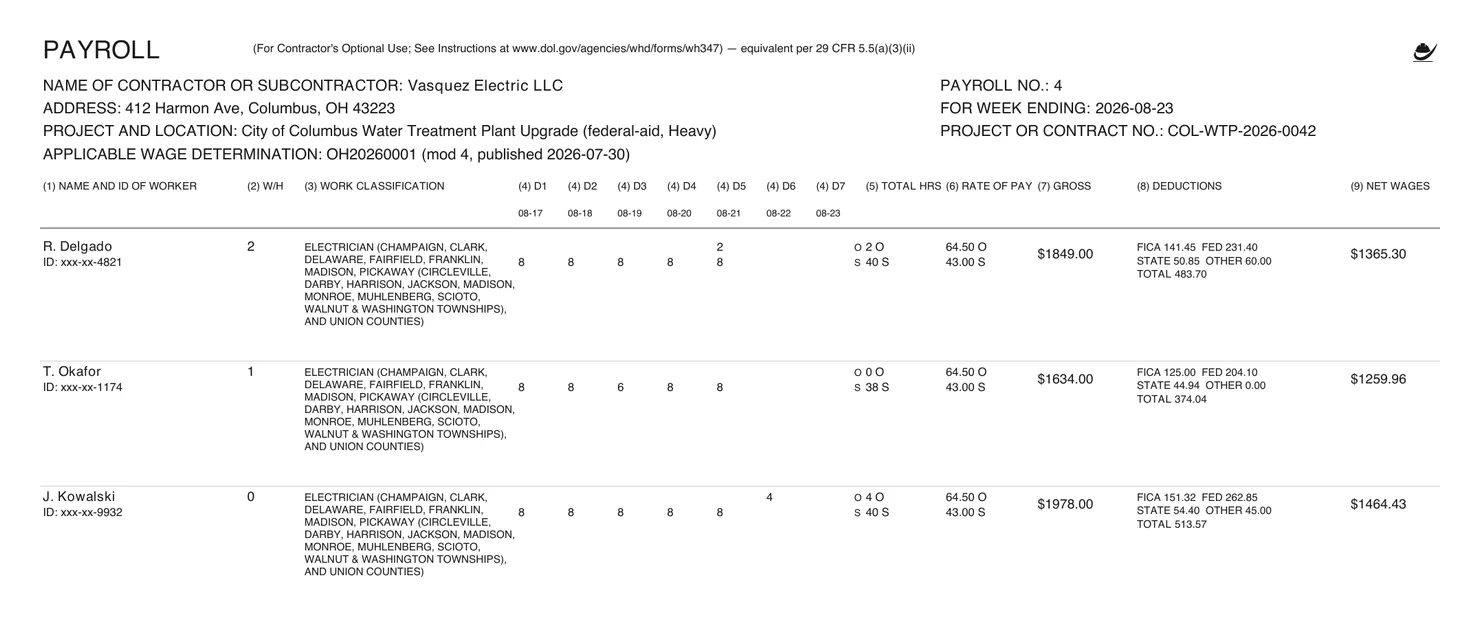
Open the sample PDFSee both pages with notes on every column
How it works
Step 1
Set up the job once — free, no card
Pick the state, county, and construction type. Payrollproof finds the published wage determination for the job and pins it: WD number, modification, and every classification's base and fringe rates.
Step 2
Enter your crew once
Name, ID last-4, classification picked from the determination's real list, withholding exemptions, and how you pay fringes — into a plan, in cash, or split.
Step 3
Each week: hours in, filing-ready report out
Type the week's daily hours from your timesheets and the deduction amounts your payroll already computed (pre-filled from last week). Preview the exact two-page report, then download the PDF to sign — or the CSV for your GC's portal.
The checks a blank form leaves to your Friday night
- Weekly overtime, derived. Hours past 40 in the week split to overtime at 1.5× the base rate — computed on the base rate, not base-plus-fringe. The report refuses to render more than 40 straight-time hours.
- Fringe answered correctly. Plan contributions, cash in lieu, or a split — the Statement of Compliance's 4(a)/4(b)/4(c) answer matches how you actually pay fringes.
- Floors checked, warnings shown. Rates below the prevailing floor, Executive Order minimum-wage gaps, and unregistered apprentice rates each get a plain warning before anything renders.
Questions subs actually ask
What does Payrollproof actually do?
It prepares your weekly certified payroll report — the payroll grid plus the Statement of Compliance, per the federal WH-347 layout — from your own payroll numbers and the government's published wage rates for your county and trade. You review it, sign it, and send it to your GC or agency. It is not payroll software: it never computes your taxes or pays anyone.
Where do the wage rates come from?
Verbatim from the Davis-Bacon wage determination published for your job's county and construction type. The determination is pinned to your job — WD number, modification number, and publish date appear on the job page with a link to the source — and overtime, fringe-credit, and prevailing-floor checks are computed from those published figures.
What if it can't do something?
It says so. More than 40 straight-time hours in a week, a rate below the prevailing floor, an apprentice rate without registered-apprenticeship backing, a classification that isn't in the determination — each shows a plain warning or blocks the report, instead of producing something that looks official and isn't.
My GC uses a compliance portal. Is the PDF useless?
Use the CSV export: the same rows, ready to key or upload into the portal your GC mandates. Payrollproof does not claim direct portal integration in v1.
My state wants its own form, not the WH-347.
v1 prepares the federal WH-347-equivalent, which covers federally funded jobs everywhere. Some states (like California and New York) run their own electronic filing systems — see the state guides for what applies to you.
What happens to my workers' information?
Only the last four digits of a worker's ID are stored — never a full SSN. Your job lives behind an unguessable link that only you have; nothing about your crew appears on any public page.
What does it cost, and how do I stop paying?
$79/month per active job, unlimited workers and weekly reports within the job. When the job ends, click Archive on the job page: billing stops at the end of the paid period, no phone call. Setup and a watermarked preview are free before you pay.
What about refunds?
If report generation fails because of our system — the artifact isn't produced or the wage-determination upstream is down at render — we refund the current period automatically. If you paid for a period and our logs show you never downloaded a report in it, contact support and we refund that period.
New to prevailing wage? Read the state-by-state certified payroll guides, or check rates before you bid at Wagebasis.